

Delete unnecessary apps.
Having too many apps installed on a tablet is a common reason for it to slow down. Consider deleting unnecessary apps to speed up your tablet and make it run smoother.
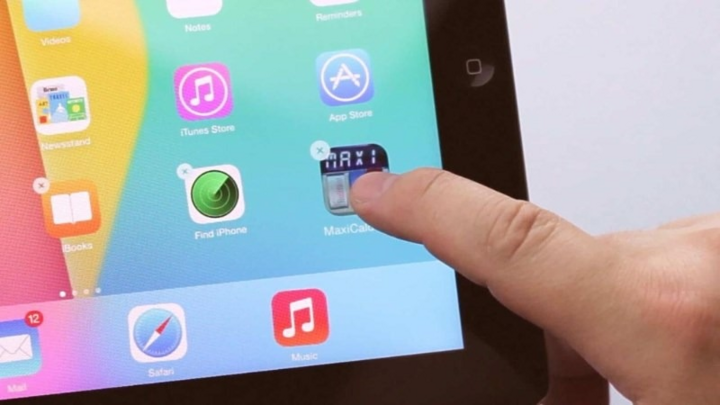
Delete unnecessary apps to help speed up your tablet and make it run more smoothly.
Close any unused applications completely.
Many people often don't completely close applications after use, causing them to continue running in the background and consume processing power, thus slowing down the tablet. To remedy this, after using an application, users should completely close it so that the tablet can achieve optimal performance.
Clean up storage space.
After prolonged use, computers accumulate a large amount of junk files, causing them to slow down. In this case, you should clear the application cache or use a built-in junk file cleaning utility.
To clear the cache, follow these steps: Go to Menu > Settings > Apps > Select the app you want to clear the cache for > Clear cache > Select OK.
In addition, storing data files such as images, audio, video , and many other types of data on your tablet can significantly reduce the device's performance, so consider keeping only the files that are truly necessary to speed up your tablet.
Turn off app notifications.
Constant notifications from apps can also slow down tablet performance. Therefore, if you don't need to monitor app notifications, turn them off to make your tablet run smoother.
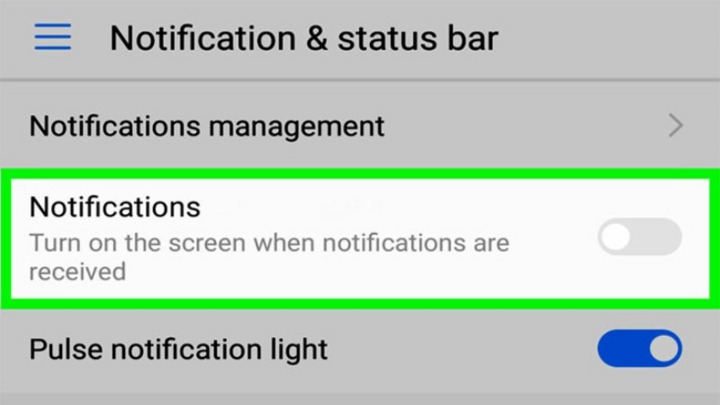
Turn off notifications for unnecessary apps to make your tablet run smoother.
Turn off GPS and Bluetooth.
Similarly, keeping GPS and Bluetooth constantly on can lead to rapid battery drain and battery degradation, as well as slowing down the tablet. Therefore, you should only turn on GPS and Bluetooth when you need to use these features.
Turn off live wallpapers.
Animated wallpapers consume a lot of resources and slow down the tablet's processing speed. Replace them with a static wallpaper to resolve this issue.
Charge your tablet promptly and avoid overheating.
Using a tablet while it's charging can also lead to overheating and reduce the device's performance.
Therefore, when using a tablet, you should enable battery saver mode to extend usage time or charge the device promptly when the battery level is around 20%.
Use the Smart Diagnosis feature.
Some tablets will have a built-in Smart Diagnostics feature in the device's Support Apps section, allowing for easy and comprehensive checks of the tablet. If all of the above methods fail to improve the tablet's performance, use the Smart Diagnostics feature for the most accurate results.
Restart your tablet periodically.
Restarting your tablet will refresh applications and system source files, thereby increasing processing performance. Additionally, this can quickly resolve software conflicts on your tablet. Therefore, restart your tablet regularly to speed up its performance.
Hoa Vu (Compiled)
Source




![[Photo] The heat at the fireworks display site on the opening night of the Da Nang International Fireworks Festival 2026](https://vphoto.vietnam.vn/thumb/1200x675/vietnam/resource/IMAGE/2026/05/27/1779889741485_ndo_br_z7872039145157-fecaba5112f39e8352544099d7ef4738-5140-jpg.webp)
![[Photo] The courage of new recruits of Brigade 144 on the training ground.](https://vphoto.vietnam.vn/thumb/1200x675/vietnam/resource/IMAGE/2026/05/27/1779881651341_anh-man-hinh-2026-05-27-luc-18-32-52.png)




























































![[Photo] The courage of new recruits of Brigade 144 on the training ground.](https://vphoto.vietnam.vn/thumb/402x226/vietnam/resource/IMAGE/2026/05/27/1779881651341_anh-man-hinh-2026-05-27-luc-18-32-52.png)































Comment (0)