

 |
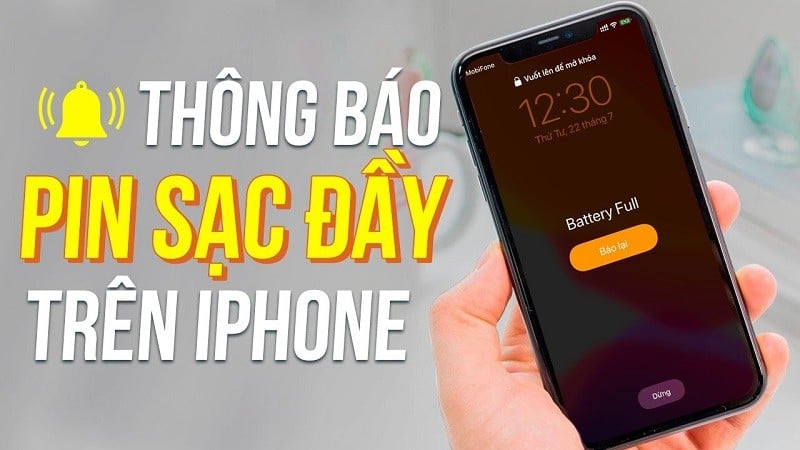
| This warning will help users avoid overcharging their iPhones even after they've reached 100%. |
Before setting up notifications to automatically activate when the iPhone is fully charged, users should take advantage of Apple's suggested battery settings to best protect the battery by going to Settings > Battery > Battery Health & Charging and switching Optimized Battery Charging to On.
This is one of the key features of the iPhone that activates if the user has a habit of charging overnight. The iPhone will catch up with that habit and always stop charging when it reaches 80%. Then, the phone will fully charge just before the user wakes up according to the alarm schedule.
Once the above setup is complete, users can activate the Automation notification feature in the Shortcuts app when their iPhone reaches 100% battery level. Here's how:
- Select the "+" icon in Automation.
- Click the Create Personal Automation button.
- Select Battery Level
- Set the Equals % mode and slide it to 100% (or any level the user desires).
- Click on Next
- Select Add Action
- Search for Play Sound or Play Music
- Click on Next
- Turn off Ask Before Running
- Select Done
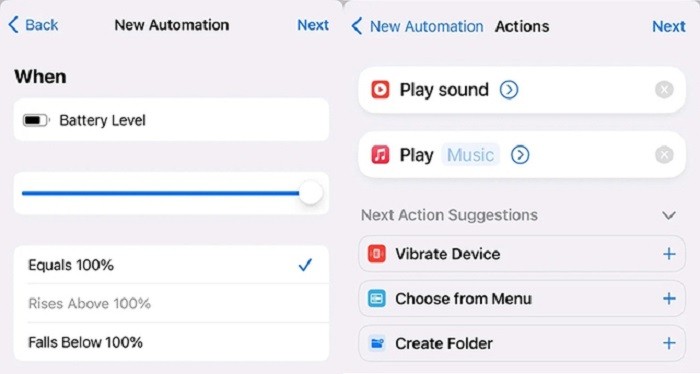 |
| iPhone users should only choose one of the two options: Play Sound or Play Music. |
Users can also choose both Play Sound and Play Music, but it's best to choose only one, as Play Music will interrupt the playlist while running and force you to restart. Furthermore, it can be problematic if the user is charging their iPhone in a public place.
Furthermore, users don't need to use this automation feature if their iPhone charging habits are predictable. If Automation is enabled while charging overnight, the alert might wake the user before the scheduled alarm goes off. Therefore, users should think carefully before choosing between these two solutions.
Source























































































Comment (0)