


Besides the fast charger included in each product box, to help users charge their phones faster, the Redmi Note 13 series also features a charging speed boost function. With just a few simple steps, you can successfully activate it.
How to enable speed charging on Redmi Note 13 series
With just two simple steps, you can easily enable faster charging on your Redmi Note 13 series phone.
Step 1: To activate the charging speed boost feature, go to "System Settings". Then find and tap on "Battery". Here, in the upper right corner of the screen, you will find a settings icon; tap it.
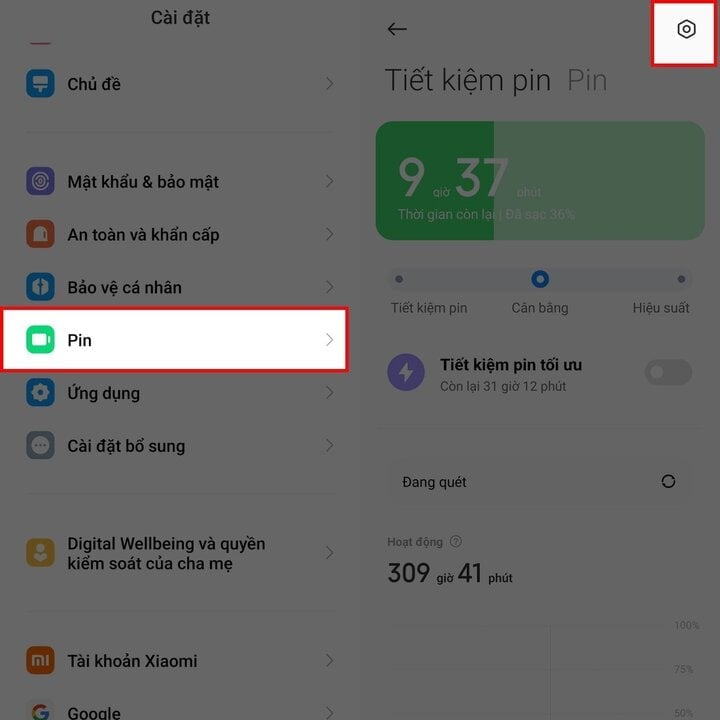
Step 2: Finally, simply flip the switch for the "Speed Up Charging" option to the right to activate it, and you're done.
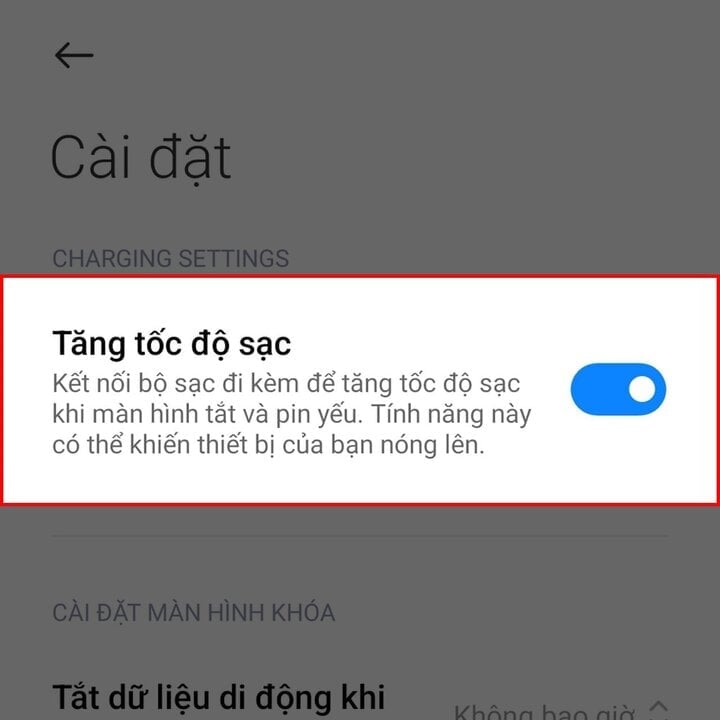
In short, with just two extremely simple steps, you can enable faster charging on your Redmi Note 13 series. Please refer to and follow these steps on your device if necessary.
Source
![[Photo] Standing Committee member of the Party Central Committee Tran Cam Tu inspects preparations for the 14th Party Congress.](/_next/image?url=https%3A%2F%2Fvphoto.vietnam.vn%2Fthumb%2F1200x675%2Fvietnam%2Fresource%2FIMAGE%2F2026%2F01%2F06%2F1767695749033_image1122-1262-jpg.webp&w=3840&q=75)































































































Comment (0)